OpenAchievements allows you to keep track of all the achievements you've unlocked in videogames that have built-in support for the OpenAchievements platform. Additionally, OpenAchievements can be used to keep track of high scores of all players that are signed up with OpenAchievements. The OpenAchievements platform is completely free to use for both players and game developers. Nothing is being monetized. There are no ads and your private data remains private.
You're ready to play a game! Pick any of the games with OpenAchievements support and follow any of the provided download links to get the game. To connect to OpenAchievements, the game will ask you to identify yourself. To do so, you can provide the email address you've used to register here at OpenAchievements, but if you prefer to keep your email address more private, you can also provide your OpenAchievements ID. This ID consists of your displayname, followed by a hash symbol (#) and your ID tag, which is a four-digit number. Your OpenAchievements ID can be found on the account page.
How you provide your OpenAchievements ID or email address can differ per game, as it's up to the game developer to provide you with the means to do so. For example, our own game Gravity Depravity has a main menu item named openachievements which leads to a screen dedicated to entering you OpenAchievements ID or email address.
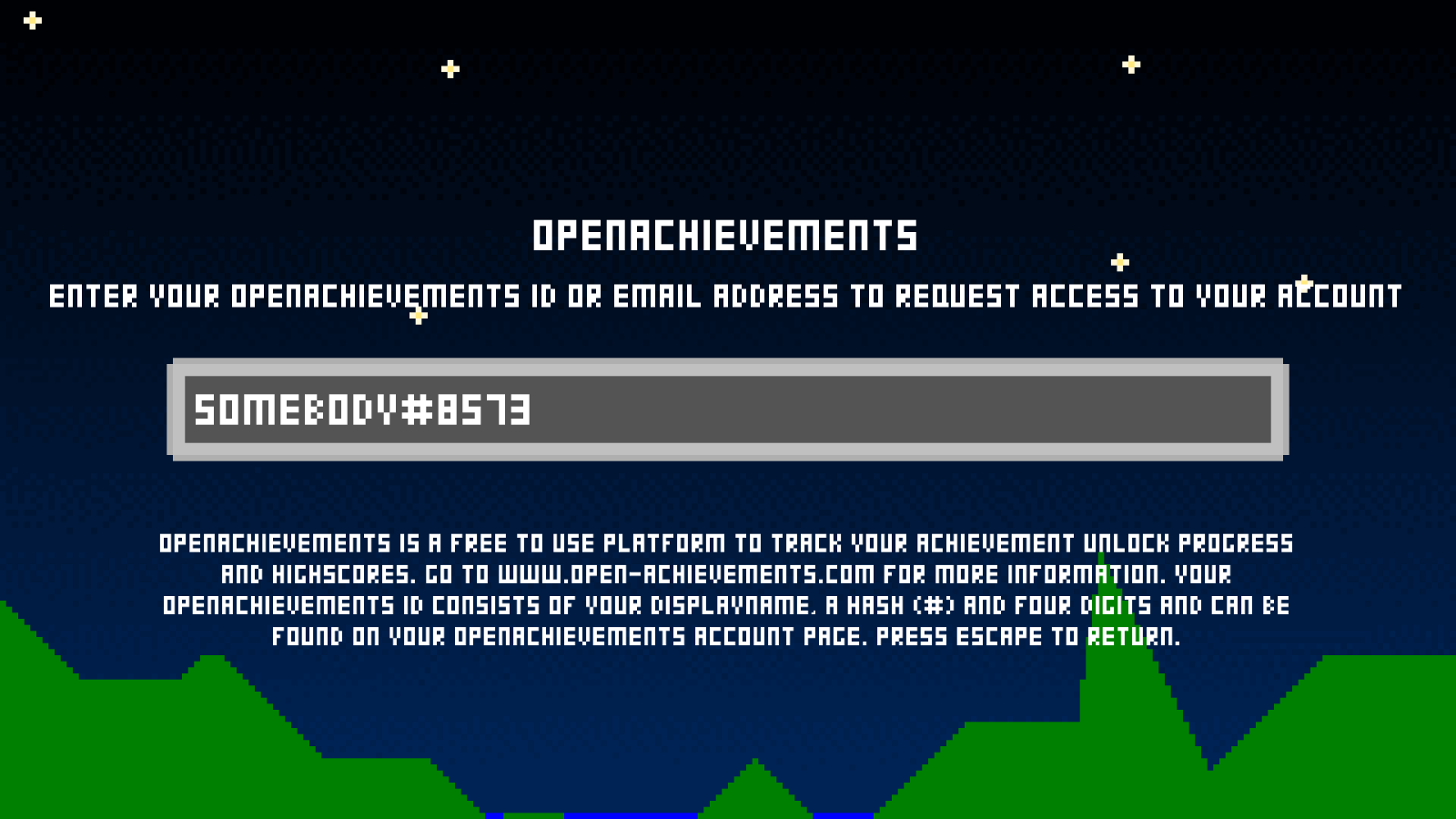
Once you've provided the game with your OpenAchievements ID or email address, the game will be able to request a connection with your account. You have to manually approve this request before the game can track achievement unlocks and leaderboard scores for you on OpenAchievements. To do so, go to your account page where you will find a list of games that are connected or have requested to connect to your account.

To allow the game access to your account, click the "allow" button next to the game's name. Granting access will allow the game to:
You only need to log in to the OpenAchievements website. To protect your account and your privacy, you do not have to disclose any sensitive information to a game. You also do not need to download, install or run an app from which you. launch your games. By requiring users to explicitly confirm game connections, the user is always in control of which game does or doens't have access to their accounts. Information other than the aforementioned points (like email addresses or data from other games) will never be shared.
Send any questions you have to admin@open-achievements.com.
Before integrating OpenAchievements into your game, you'll need to register a development studio. You can do this on the Developers page. Click the Create a new development studio button and enter the name of your studio. When the studio has been created, you can edit its properties to change the name and set a website URL. Additional members for this studio can be added as well. Every member has the same (full) priviliges to edit and manage the development studio and its games.
The next step is to add a game. When adding a game, you'll need to enter the following information:
| Name | The name of the game |
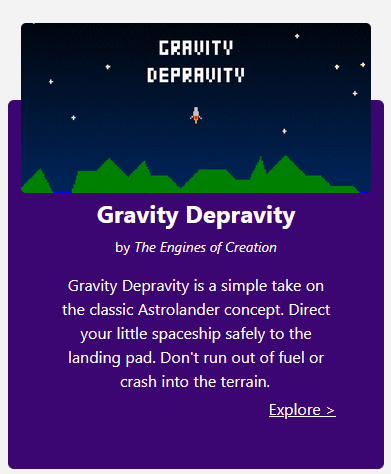
| Description | A short description of the game, max 200 characters. Displayed on the small game panel in listings (see image below). |
| Long description | The long description of the game, max 8192 characters. Displayed on the game overview page. |
| Published status | A game is only publicly visible when it's published. Achievements can still be unlocked and leaderboard scores can still be posted for unpublished games for testing purposes. |
OpenAchievements offers a public web API your game can use to connect to and communicate with OpenAchievements. We've also made a client implementation available that was developed in C#. The client offers functionality for all features the OpenAchievements web API offers. Source code and documentation for the .NET client is available through the GitHub repository.
Pick any of the options below to find out more about the various ways of connecting with OpenAchievements.
Discover how to use the Web API to communicate with the OpenAchievements backend.
Use our .NET client in your own .NET projects, abstracting away all HTTP communication for you.
To communicate with the web API your game needs to perform HTTP requests to the OpenAchievements web API service. This service offers a number of methods that will be
outlined below. All requests need to be executed in the form of POST requests. The endpoint can be found at:
https://www.open-achievements.com/service/service.php/[servicename]/[methodname]
Any arguments for the request are included with the request as Multipart FormData.
All requests to the web API need to provide the game's private ID (a secret ID used to identify which game is communicating with OpenAchievements) and most requests need
to provide a connection token as well (this identifies on behalf of which user the game is communicating with OpenAchievements). Note that a game's private ID
should never be shared with anyone or any service other than the OpenAchievements web API. Once others have access to your game's private ID, they can perform
requests to OpenAchievements while pretending to be your game. The connection token is always verified in combination with the game's private ID, so games cannot
abuse a connection token meant for a different game.
The process to connect to OpenAchievements is as follows:
The response to each request comes in the form of a JSON string. The JSON always contains a status and statusmessage. A status code of 0 means the request was handled successfully.
string"NoSession" The token is not valid."AwaitingConfirmation" The token is valid but not confirmed by the user yet."Active" The token is valid and has been confirmed by the user.
MultipartFormDataContent formData = new MultipartFormDataContent();
formData.Add(new StringContent("abcdefghijklmn", Encoding.UTF8, MediaTypeNames.Text.Plain), "gamePrivateId");
formData.Add(new StringContent("zyxwvutsrqponm", Encoding.UTF8, MediaTypeNames.Text.Plain), "token");
HttpClient httpClient = new HttpClient();
HttpResponseMessage response = await httpClient.PostAsync(
"https://www.open-achievements.com/service/service.php/user/getgamesessionstatus",
formData
);
string responseBody = await response.Content.ReadAsStringAsync();
Console.Write(responseBody);
{
sessionStatus: "Active",
status: 0,
statusmessage: "OK"
}
string
MultipartFormDataContent formData = new MultipartFormDataContent();
formData.Add(new StringContent("abcdefghijklmn", Encoding.UTF8, MediaTypeNames.Text.Plain), "gamePrivateId");
formData.Add(new StringContent("Somebody#8573", Encoding.UTF8, MediaTypeNames.Text.Plain), "id");
HttpClient httpClient = new HttpClient();
HttpResponseMessage response = await httpClient.PostAsync(
"https://www.open-achievements.com/service/service.php/user/creategamesession",
formData
);
string responseBody = await response.Content.ReadAsStringAsync();
Console.Write(responseBody);
{
token: "zyxwvutsrqponm",
status: 0,
statusmessage: "OK"
}
string
MultipartFormDataContent formData = new MultipartFormDataContent();
formData.Add(new StringContent("abcdefghijklmn", Encoding.UTF8, MediaTypeNames.Text.Plain), "gamePrivateId");
formData.Add(new StringContent("zyxwvutsrqponm", Encoding.UTF8, MediaTypeNames.Text.Plain), "token");
HttpClient httpClient = new HttpClient();
HttpResponseMessage response = await httpClient.PostAsync(
"https://www.open-achievements.com/service/service.php/user/getcurrentuser",
formData
);
string responseBody = await response.Content.ReadAsStringAsync();
Console.Write(responseBody);
{
name: "Somebody",
status: 0,
statusmessage: "OK"
}
booleantrue or false, indicating whether the user has unlocked this achievement or not.
MultipartFormDataContent formData = new MultipartFormDataContent();
formData.Add(new StringContent("abcdefghijklmn", Encoding.UTF8, MediaTypeNames.Text.Plain), "gamePrivateId");
formData.Add(new StringContent("zyxwvutsrqponm", Encoding.UTF8, MediaTypeNames.Text.Plain), "token");
formData.Add(new StringContent("fghijkl", Encoding.UTF8, MediaTypeNames.Text.Plain), "id");
HttpClient httpClient = new HttpClient();
HttpResponseMessage response = await httpClient.PostAsync(
"https://www.open-achievements.com/service/service.php/achievements/isunlocked",
formData
);
string responseBody = await response.Content.ReadAsStringAsync();
Console.Write(responseBody);
{
unlocked: true,
status: 0,
statusmessage: "OK"
}
string[]
MultipartFormDataContent formData = new MultipartFormDataContent();
formData.Add(new StringContent("abcdefghijklmn", Encoding.UTF8, MediaTypeNames.Text.Plain), "gamePrivateId");
formData.Add(new StringContent("zyxwvutsrqponm", Encoding.UTF8, MediaTypeNames.Text.Plain), "token");
HttpClient httpClient = new HttpClient();
HttpResponseMessage response = await httpClient.PostAsync(
"https://www.open-achievements.com/service/service.php/achievements/getunlocked",
formData
);
string responseBody = await response.Content.ReadAsStringAsync();
Console.Write(responseBody);
{
achievements: ["fghijkl", "mnopqrs", "tuvwxyz"],
status: 0,
statusmessage: "OK"
}
booleantrue or false, indicating whether the achievements were just unlocked or not. If any of the achievements failed to unlock, the value will be false.
MultipartFormDataContent formData = new MultipartFormDataContent();
formData.Add(new StringContent("abcdefghijklmn", Encoding.UTF8, MediaTypeNames.Text.Plain), "gamePrivateId");
formData.Add(new StringContent("zyxwvutsrqponm", Encoding.UTF8, MediaTypeNames.Text.Plain), "token");
formData.Add(new StringContent("fghijkl;mnopqrs;tuvwxyz", Encoding.UTF8, MediaTypeNames.Text.Plain), "ids");
HttpClient httpClient = new HttpClient();
HttpResponseMessage response = await httpClient.PostAsync(
"https://www.open-achievements.com/service/service.php/achievements/unlock",
formData
);
string responseBody = await response.Content.ReadAsStringAsync();
Console.Write(responseBody);
{
unlocked: true,
status: 0,
statusmessage: "OK"
}
objectobject[]stringstringstringstringintintstringintstringboolean
MultipartFormDataContent formData = new MultipartFormDataContent();
formData.Add(new StringContent("abcdefghijklmn", Encoding.UTF8, MediaTypeNames.Text.Plain), "gamePrivateId");
formData.Add(new StringContent("fafaghghfaghfa", Encoding.UTF8, MediaTypeNames.Text.Plain), "leaderboardPrivateId");
formData.Add(new StringContent("zyxwvutsrqponm", Encoding.UTF8, MediaTypeNames.Text.Plain), "token");
formData.Add(new StringContent("0", Encoding.UTF8, MediaTypeNames.Text.Plain), "offset");
formData.Add(new StringContent("25", Encoding.UTF8, MediaTypeNames.Text.Plain), "length");
HttpClient httpClient = new HttpClient();
HttpResponseMessage response = await httpClient.PostAsync(
"https://www.open-achievements.com/service/service.php/leaderboards/getdata",
formData
);
string responseBody = await response.Content.ReadAsStringAsync();
Console.Write(responseBody);
{
leaderboard: {
id: "iekdshandjeiw",
privateId: "fafaghghfaghfa",
name: "High scores",
gameId: "jeuwidksjwmsnd",
entryCount: 263
},
entries: [
{
"rank": 1,
"displayName": "CoolDude",
"score": 2197,
"date": "2026-07-09",
"currentUser": false
},
{
"rank": 2,
"displayName": "Friendly_Player",
"score": 2180,
"date": "2026-07-19",
"currentUser": false
},
{
"rank": 3,
"displayName": "Somebody",
"score": 2175,
"date": "2026-07-12",
"currentUser": true
},
{
"rank": 4,
"displayName": "KingGAMER",
"score": 2155,
"date": "2026-06-30",
"currentUser": false
},
// etcetera...
],
status: 0,
statusmessage: "OK"
}
int
MultipartFormDataContent formData = new MultipartFormDataContent();
formData.Add(new StringContent("abcdefghijklmn", Encoding.UTF8, MediaTypeNames.Text.Plain), "gamePrivateId");
formData.Add(new StringContent("fafaghghfaghfa", Encoding.UTF8, MediaTypeNames.Text.Plain), "leaderboardPrivateId");
formData.Add(new StringContent("zyxwvutsrqponm", Encoding.UTF8, MediaTypeNames.Text.Plain), "token");
HttpClient httpClient = new HttpClient();
HttpResponseMessage response = await httpClient.PostAsync(
"https://www.open-achievements.com/service/service.php/leaderboards/getuserscore",
formData
);
string responseBody = await response.Content.ReadAsStringAsync();
Console.Write(responseBody);
{
score: 2175,
status: 0,
statusmessage: "OK"
}
MultipartFormDataContent formData = new MultipartFormDataContent();
formData.Add(new StringContent("abcdefghijklmn", Encoding.UTF8, MediaTypeNames.Text.Plain), "gamePrivateId");
formData.Add(new StringContent("fafaghghfaghfa", Encoding.UTF8, MediaTypeNames.Text.Plain), "leaderboardPrivateId");
formData.Add(new StringContent("zyxwvutsrqponm", Encoding.UTF8, MediaTypeNames.Text.Plain), "token");
formData.Add(new StringContent("2175", Encoding.UTF8, MediaTypeNames.Text.Plain), "score");
HttpClient httpClient = new HttpClient();
HttpResponseMessage response = await httpClient.PostAsync(
"https://www.open-achievements.com/service/service.php/leaderboards/submitscore",
formData
);
string responseBody = await response.Content.ReadAsStringAsync();
Console.Write(responseBody);
{
status: 0,
statusmessage: "OK"
}